
Krea 2 Turbo: Text-to-Image - 5 Experiments for UGC-Style Ads
Introduction
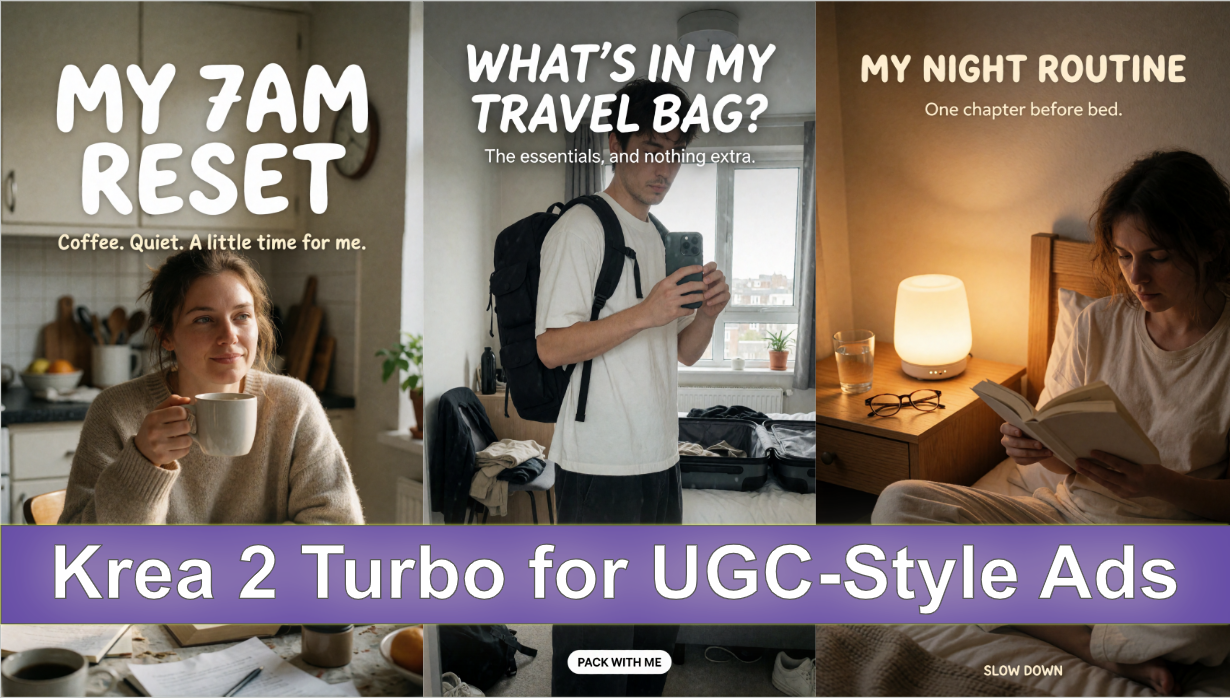
UGC-style advertising aims to feel personal, spontaneous, and native to social feeds, not polished like a traditional studio campaign. The challenge is to create a believable everyday moment while retaining enough composition and negative space for a clear advertising message.
This article explores five still-image concepts: a morning routine, a desk reset, a travel-backpack mirror selfie, a commuter wearing headphones, and an evening reading routine. Krea 2 Turbo generates images, not actual creator videos, so these prompts are intended for static ad concepts and thumbnails. Any creator or implied product experience used in a real campaign should be authentic or clearly disclosed as fictional or AI-generated.
Model Configuration and Inference Optimizations
For our image generation experiments, we used Krea 2 Turbo in ComfyUI, combining an INT8-quantized diffusion model with an FP8 text encoder to reduce memory requirements and make inference more efficient.
Our generation setup consisted of:
| Component | Configuration |
|---|---|
| Diffusion Model | Krea 2 Turbo — INT8 ConvRot |
| Text Encoder | Qwen3-VL 4B — FP8 Scaled |
| VAE | Qwen Image VAE |
| Inference Framework | ComfyUI |
Why These Optimizations Matter
The INT8 ConvRot diffusion model reduces model-weight memory requirements compared with higher-precision variants, making Krea 2 Turbo more practical to run on GPUs with limited VRAM.
The Qwen3-VL 4B FP8 Scaled text encoder further reduces the memory footprint of prompt processing, while the Qwen Image VAE handles image encoding and decoding.
Together, these components provide a memory-efficient configuration for exploring Krea 2 Turbo's image generation capabilities in ComfyUI. Actual generation speed, VRAM usage, and output quality depend on the GPU, resolution, and sampling settings.
Prompting Approach
For a UGC look, describe ordinary environments, imperfect framing, natural light, and candid body language. Avoid over-staging the scene. Keep the message short and leave a relatively quiet part of the image for text. Do not invent reviews, ratings, testimonials, or claims about a real person's experience.
1. Morning Routine - Relatable Creator Aesthetic
Format: 9:16 vertical
Creative direction: Natural morning light and casual smartphone photography.
Prompt
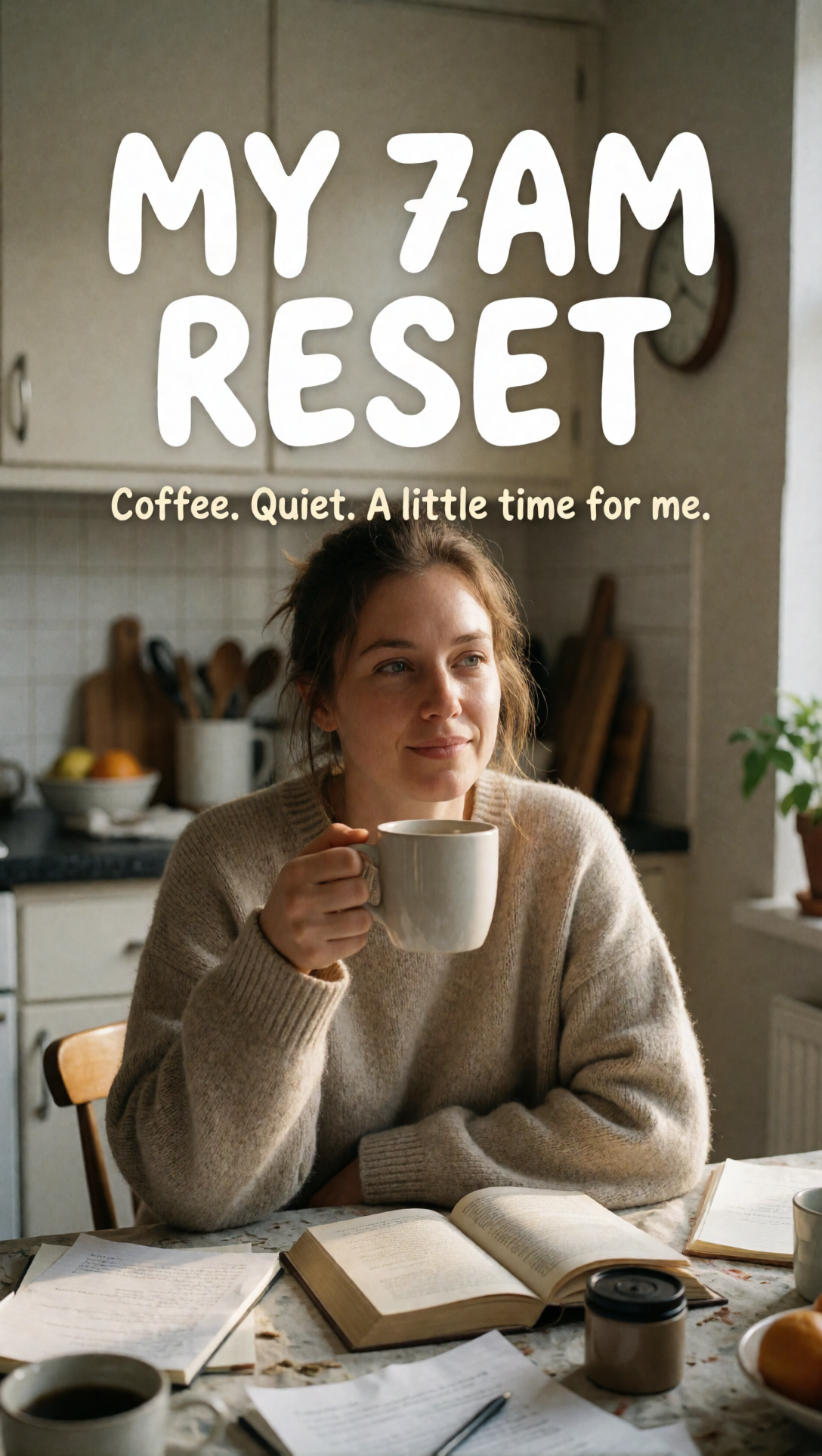
Create an authentic vertical smartphone photograph for a UGC-style social ad. A woman in her late twenties wearing an oversized oatmeal sweater sits at a slightly messy kitchen table in early morning light, holding a white ceramic coffee mug. Her hair is loosely tied and her expression is relaxed and candid. Include a paperback book, scattered notebook pages, and a small coffee container. Use realistic skin texture, imperfect framing, gentle grain, and natural household shadows, as if captured casually on a phone. Leave the upper quarter uncluttered. Add the exact white rounded headline "MY 7AM RESET" and the smaller cream line "Coffee. Quiet. A little time for me." No studio lighting, staged influencer pose, fake social interface, or extra captions.
What to evaluate: Whether the scene feels lived-in rather than staged, and whether the text area remains readable.
Output Image
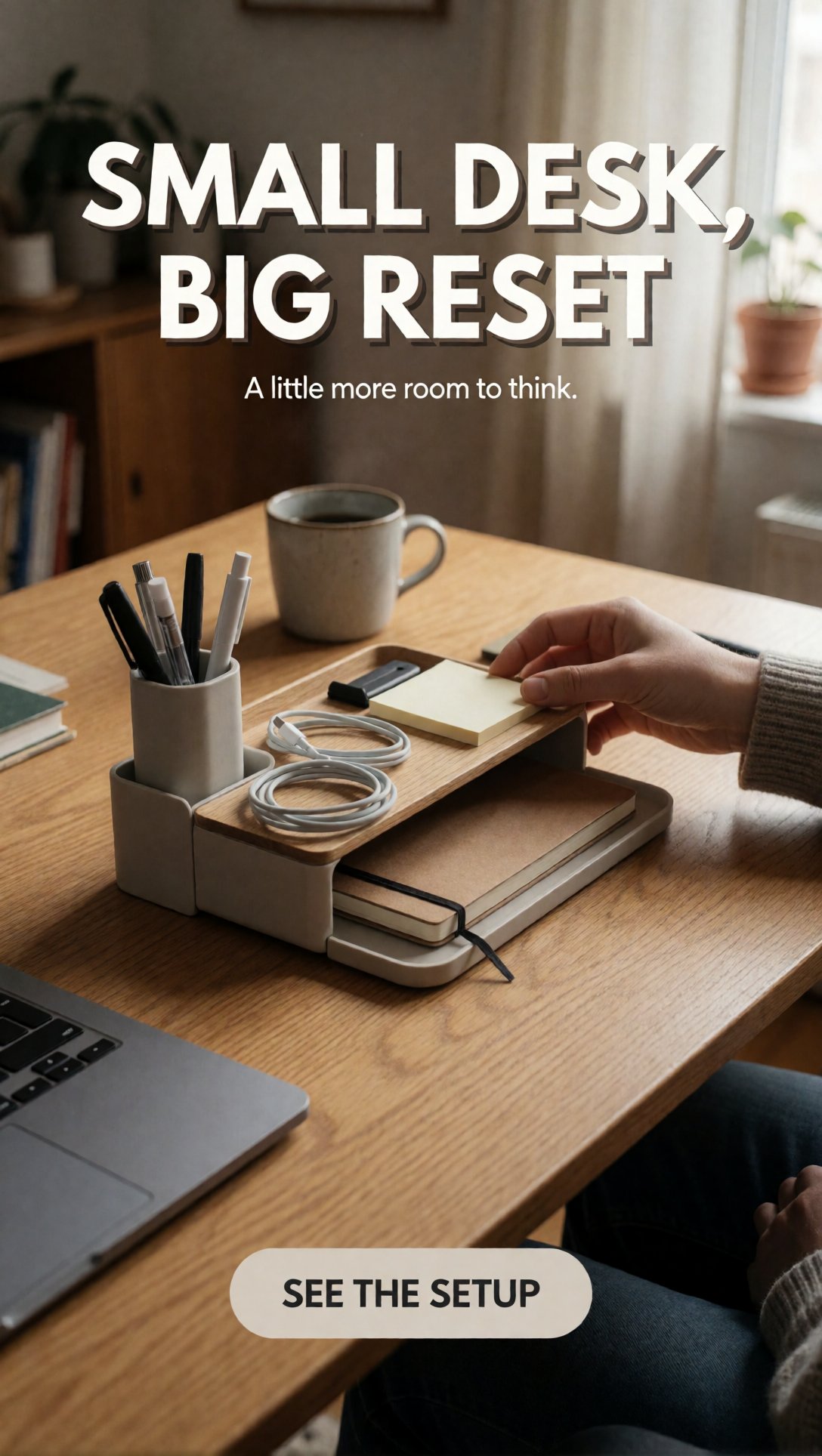
2. Desk Organization - Everyday Reset
Format: 9:16 vertical
Creative direction: Compact home office and an approachable, practical mood.
Prompt
Create a realistic vertical smartphone photograph of a compact home-office desk after an everyday organization session. A light-oak desk holds a modular organizer with pens, charging cables, sticky notes, and a notebook. One hand naturally adjusts the organizer. Include a ceramic coffee cup and laptop nearby, in a modest lived-in apartment rather than a luxury showroom. Afternoon window light creates soft irregular shadows. Use casual phone-camera imperfections and believable household objects. At the top, add the bold white headline "SMALL DESK, BIG RESET", followed by "A little more room to think." Near the bottom, add a rounded neutral CTA reading "SEE THE SETUP". No fake review scores or extra text.
What to evaluate: Object plausibility, natural hand placement, and whether the organizer is clear enough to understand at a glance.
Output Image
3. Travel Backpack - Mirror-Selfie Creative
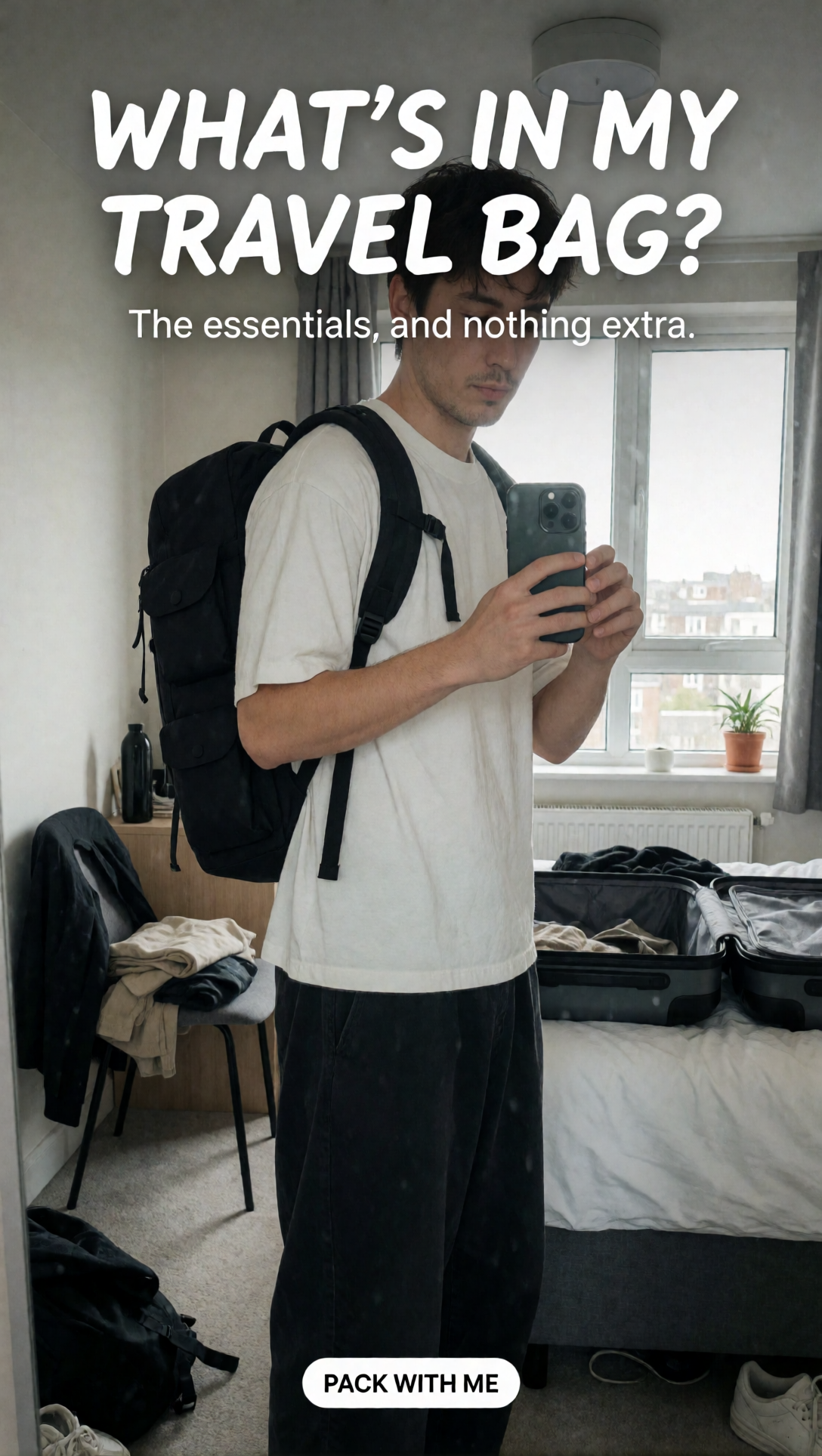
Format: 9:16 vertical
Creative direction: Pre-trip bedroom, casual mirror selfie, practical backpack.
Prompt
Create an authentic vertical mirror-selfie photograph of a young adult traveler in a slightly cluttered apartment bedroom. The traveler wears a relaxed white T-shirt and loose dark trousers with a black 25-liter minimalist backpack featuring practical exterior compartments. They hold a smartphone naturally in front of their chest. Include an open suitcase, clothes on a chair, and overcast window light. Use realistic smartphone wide-angle perspective, natural fabric folds, imperfect reflections, and slight photographic grain. Add the exact casual white headline "WHAT'S IN MY TRAVEL BAG?", the supporting line "The essentials, and nothing extra." and the small bottom tag "PACK WITH ME". No fake platform UI or additional captions.
What to evaluate: Backpack structure, mirror reflections, hand anatomy, and whether the image looks like a real pre-trip snapshot.
Output Image
4. Commuter Lifestyle - Headphones in Use
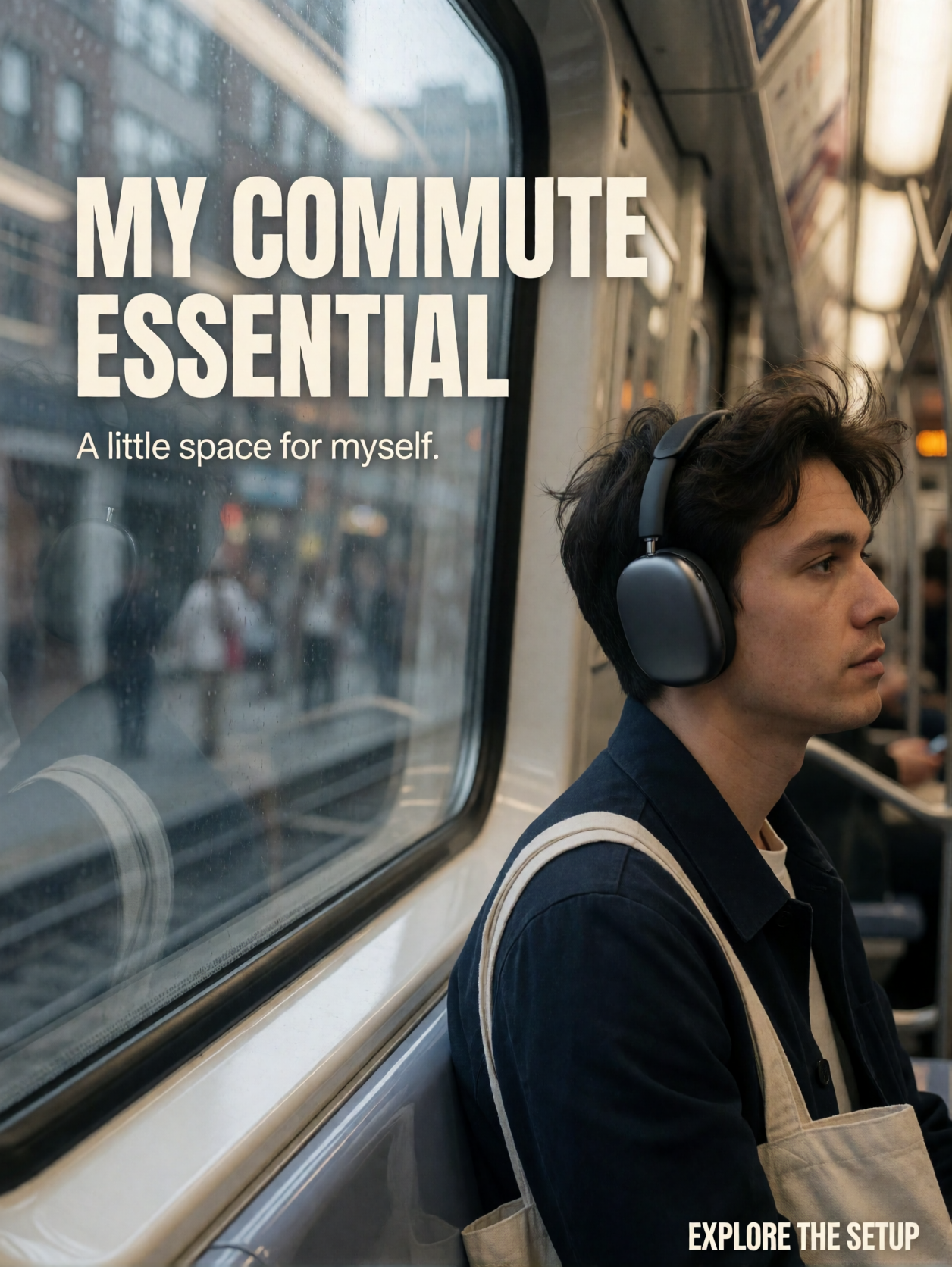
Format: 4:5 portrait
Creative direction: City subway, documentary phone photography, subdued color.
Prompt
Create a candid smartphone lifestyle photograph inside a modern city subway carriage. A young working professional with natural skin texture and slightly windswept hair sits beside the window wearing matte-charcoal over-ear headphones, a simple navy jacket, and a canvas tote bag. Reflections of the passing city create a subtle blur on the window. The subject looks thoughtfully outside rather than posing for the camera. Use everyday transit lighting, subdued colors, slightly asymmetrical framing, and authentic phone-photo quality. Reserve a quiet part of the upper-left window for the exact off-white headline "MY COMMUTE ESSENTIAL", the smaller line "A little space for myself." and a compact CTA "EXPLORE THE SETUP". No glossy studio look or extra text.
What to evaluate: Natural posture, headphone fit, believable transit lighting, and readability against the window.
Output Image
5. Evening Reading Routine - Cozy Still Image
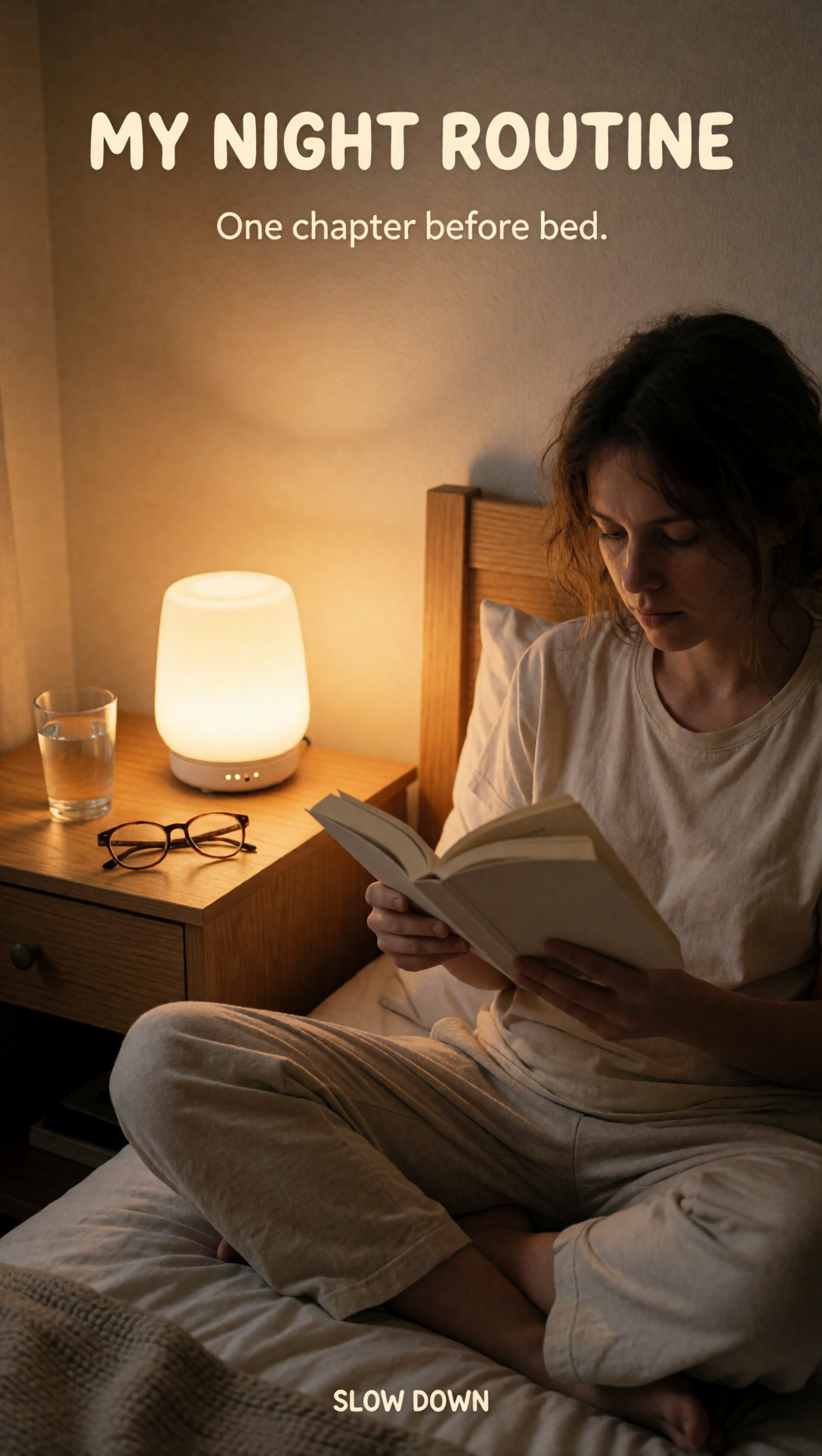
Format: 9:16 vertical
Creative direction: Warm ambient light, quiet bedroom, bedside lamp as hero object.
Prompt
Create a warm candid vertical smartphone photo of a young adult sitting cross-legged on a bed reading a paperback book in a small apartment bedroom. A compact rechargeable bedside lamp with a soft amber glow sits on a wooden nightstand beside a water glass and folded eyeglasses. The person wears comfortable cotton sleepwear and has naturally messy hair and an unposed expression. Use realistic phone-camera white balance, gentle grain, imperfect household styling, and a cozy evening atmosphere. Make the lamp clearly visible. Add the exact cream headline "MY NIGHT ROUTINE", the smaller line "One chapter before bed." and the bottom caption "SLOW DOWN". No excessive retouching or additional writing.
What to evaluate: Whether the lamp remains visible, whether the light feels plausible, and whether the scene retains its everyday character.
Output Image
Conclusion
UGC-style concepts benefit from specific everyday details more than from elaborate visual effects. Natural light, believable clutter, imperfect framing, and relaxed body language help establish the intended tone. Krea 2 Turbo can be used to explore these visual directions, but the image alone does not establish a real testimonial or product experience.
For a campaign, test several crops and text placements, then add approved copy and real branding in an editor. Keep the visual honest and make sure any AI-generated people or scenarios are handled transparently.
Krea 2 Turbo on HexGrid.cloud
Run* Krea 2 Turbo *on HexGrid in one click — no CUDA setup, no dependency hunting, no environment debugging.
The template comes preconfigured with ComfyUI, the required runtime, and the Krea 2 Turbo setup so you can launch a GPU workspace and start generating immediately.
No manual CUDA installation. No PyTorch version matching. No broken requirements. No hours spent wiring the environment together.
Just choose the Krea 2 Turbo template, start the instance, and open ComfyUI.
Pricing starts from $0.58/hour*, so you can spin up a GPU only when you need it and shut it down when you’re done.*
About the author
- HexGrid Cloud is building the infrastructure that makes powerful AI models accessible to everyone. We're creating a private AI cloud where developers, creators, and AI teams can deploy cutting-edge generative models, launch ready-to-use ComfyUI workflows, and access dedicated GPUs without the complexity of managing infrastructure. Our platform brings together three core capabilities: - ComfyUI Cloud: Launch preconfigured image and video generation workflows with models like MiniMax H3, Wan, LTX, and FLUX. Bring your own models, custom nodes, and LoRAs. - On-Demand GPU Cloud: Access dedicated NVIDIA GPUs, including H100, H200, A100, and B200, with transparent pricing and full control over your environment. - AI Model APIs: Integrate powerful AI models into applications without managing the underlying infrastructure.
Comments
Join the discussionNo comments yet. Be the first to comment.
AI Image Generation Models & Benchmarks
Explore hands-on benchmarks, output comparisons, and performance tests of open-source AI image generation models, including Qwen Image, FLUX, Z-Image, and more. We evaluate text-to-image generation, image editing, photorealism, typography, prompt adherence, and visual quality using consistent real-world test prompts. Each article includes generated image samples, ComfyUI workflows, inference configurations, GPU requirements, VRAM usage, generation speed, and cost analysis. We also explore inference engines such as ComfyUI, SgLang and vLLM-Omni to understand how different deployment methods affect performance. Compare models, examine actual outputs, and discover which AI image generation models work best for different use cases.